Glora AI: Photo & Video Editor
- 4.3
- Rating
- 10.00K
- Installs
- Free
- Price

 Analysis by App-foxy
I approached Glora AI: Photo & Video Editor as a practical photography app rather than a simple collection of novelty filters. Its main appeal is the way it puts several popular AI editing ideas in one place: portrait transformations, anime-style experiments, hairstyle changes, baby-generation effects, and edits for both photos and videos. My overall impression is positive, but with an important qualification: it is most enjoyable when I treat the results as creative drafts and social content, not as a replacement for careful manual editing.
That distinction matters because AI editing is rarely about pressing one button and receiving a perfect image. The quality of the source photo, the clarity of the face, the chosen style, and the amount of editing I am willing to accept all affect the result. Glora AI is at its best when I use it to explore possibilities quickly. It is less convincing when I expect exact realism, professional retouching, or complete control over every small detail.
What makes Glora AI useful in everyday editing
The app comes from Glora AI and sits in the photography category, although its video tools make it broader than a conventional photo editor. I found the concept easy to understand: choose an image or clip, select an AI treatment, and wait for the app to reinterpret the material. That straightforward workflow makes it approachable for people who do not want to learn layers, masks, curves, or complicated adjustment panels.
You May Also Like

 AccuWeather: Weather Radar
AccuWeather Review: A Quick, Clear Forecast for Everyday Decisions
For everyday plans, the best forecast is the one you can understand quickly. AccuWeather makes rain timing, radar, and local conditions easy to act on, with a few trade-offs.

 Hill Climb Racing
Why Hill Climb Racing Still Turns Crashes Into One More Run
A tiny car, a bumpy hill and one more upgrade: Hill Climb Racing keeps resurfacing because its simple chaos makes every near-miss feel personal.

 AliExpress - Shopping App
AliExpress Makes Global Shopping Feel Personal, but Shoppers Bear the Risk
AliExpress turns a global marketplace into a pocket-sized discovery engine. Its reach is useful, its shopping loop compelling, and its trade-offs easy to miss.

 Lords Mobile: Kingdom Wars
Lords Mobile Is a Kingdom-Building Routine, Not a Quick Match
A case-by-case verdict on the building, battles, device demands, and social commitments that make Lords Mobile rewarding for some players and exhausting for others.

 PDF Scanner app - TapScanner
TapScanner Makes Paperwork Easier to Capture, Check, and Share
TapScanner makes scanning with a phone feel less like a rescue operation and more like a dependable step in getting work done. Its capture tools are useful, though not flawless.

 Block Blast!
 Shows How Much a Puzzle Game Can Leave Out
A quiet grid game shows why puzzle players increasingly value instant clarity, repeatable skill and low-pressure play—and where the genre still needs to catch up.
More From Our News Desk
View All News


The strongest part of the experience is variety. I can move from an anime-inspired portrait to a hairstyle experiment without installing separate tools, then try a more playful baby generator effect or an ordinary AI enhancement. This range gives the app a useful role for casual creators who enjoy testing several visual directions before deciding what to share.
In my experience, the best results come from starting with a clean, front-facing portrait. Even lighting, a visible face, and a simple background give the system less visual confusion to resolve. A heavily shadowed selfie, a face partly covered by sunglasses, or a crowded group photo is a tougher assignment. This is one of the first practical lessons I would give a new user: the original photo is part of the edit, not just raw material that the app can magically repair.
For a normal social post, the app can save time. Imagine taking a quick portrait before meeting friends and wanting several versions for different moods. Instead of opening a desktop editor, searching for individual effects, and manually adjusting each copy, I can test a few AI directions from the same starting image. The process is especially convenient when the goal is entertainment, a profile experiment, or a themed post rather than a polished portfolio image.
Portrait transformations are the most immediately engaging tools
The portrait-focused options are where I noticed the clearest reason to return. Hairstyle changes are useful not because they should replace a visit to a stylist, but because they let me compare broad ideas before making a real decision. A generated style can show whether I prefer a softer, shorter, more dramatic, or more playful look. I would still treat the result as inspiration, since generated hair may blend into the forehead, ears, or background in ways that would not happen in a real photograph.
The anime effects have a different purpose. They are not trying to preserve every natural detail; they deliberately reinterpret the face. That makes small inconsistencies less distracting than they would be in a realistic edit. I found these styles better suited to avatars, casual posts, and creative experiments than to images where I need my appearance to remain completely accurate.
The baby generator is similarly best understood as a playful visual exercise. It can be entertaining for couples, families, or friends who want to imagine a fictional result, but I would not use it for serious predictions or personal decisions. The generated image is an artistic output, not a dependable statement about what a future child would look like.
These distinctions are important because they help prevent disappointment. When I choose a stylized effect for a stylized purpose, unusual details can feel intentional. When I choose a realistic-looking edit and inspect it closely, mismatched eyes, strange hair edges, or altered facial proportions become more noticeable. My advice is to judge the app by the kind of result it is designed to create, not by an expectation of photographic truth.
Video editing changes the practical value of the app
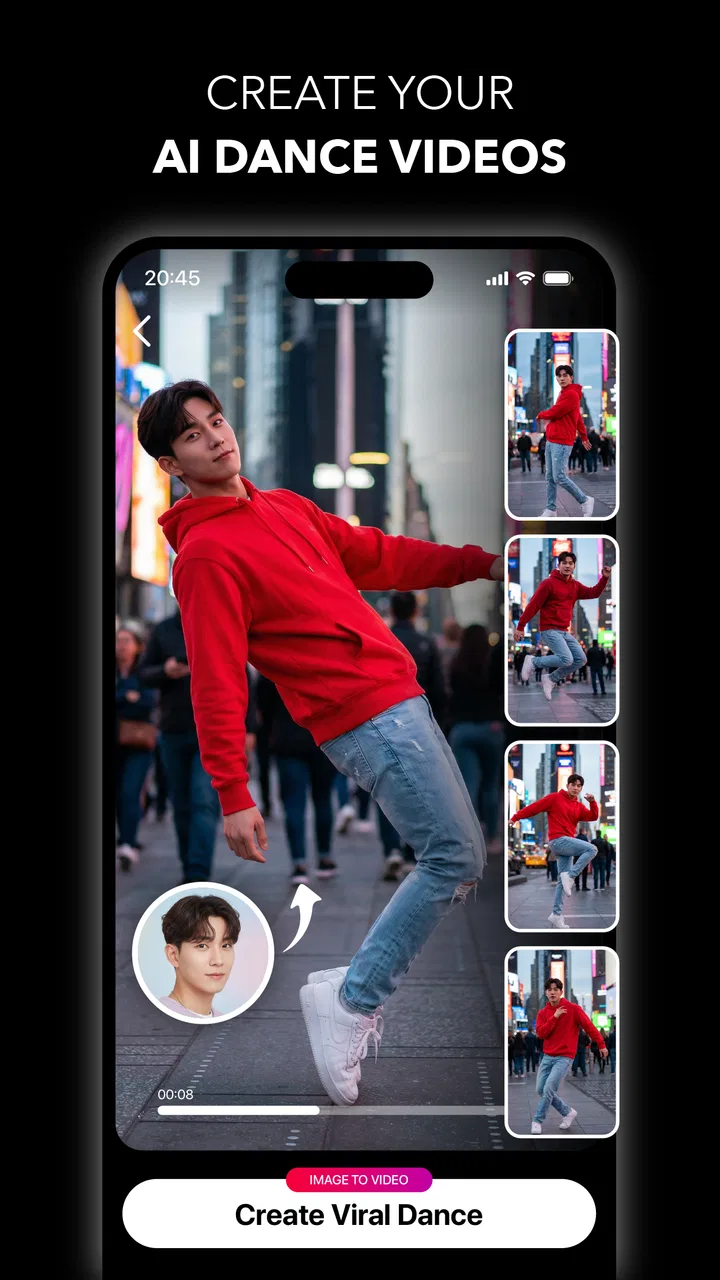
Many AI photography tools are comfortable with still images but become less useful once movement enters the frame. Glora AI’s focus on photos and videos makes it more relevant to people who post short clips, although I would approach video work with more patience. A still image gives the system one frame to interpret. A video asks the visual treatment to remain convincing as the subject moves, the camera shifts, and the lighting changes.
That creates a meaningful trade-off. A striking effect on one frame may not look equally stable throughout a clip. For a short, playful video, that may be perfectly acceptable. For a product demonstration, a professional announcement, or a clip where the person must remain recognizable, I would prefer a conventional editor with more dependable timeline control and manual correction.
A useful workflow is to keep the source clip short and focused. If I want to test an effect, I would first select a small section with clear movement rather than processing a long recording immediately. This makes it easier to judge whether the style holds together and avoids spending time on a result that becomes distracting after the first few seconds. It also encourages a more deliberate creative process: test, inspect, then decide whether the effect deserves a longer edit.
Glora AI is therefore not a full replacement for established video editors. Traditional apps remain stronger when I need precise trimming, audio placement, captions, transitions, color correction, or exact control over a sequence. Glora AI’s advantage is the speed of visual experimentation, not the depth of a complete production timeline.
What the version, cost, and ratings tell me as a user
The app is free to install and suitable for Everyone, which lowers the barrier to trying its creative tools. At the same time, in-app purchases range from $6.99 to $99.99 per item. That is a wide spread, so I would not begin by assuming that every effect or export option is included without charge. I would first explore the available workflow, see what can be tested freely, and only then decide whether a paid item fits my actual use.
The current version is 0.8.0, and that number shapes my expectations. I see it as a developing product rather than a completely mature editing suite. A newer app can feel energetic and focused, but it may also have rough edges in consistency, processing, or the way different effects behave. I would keep the app updated and judge it by the specific tools I use instead of assuming that every category—anime, hair, baby generation, photo editing, and video—will be equally refined.
Its average rating is 4.3 from around 559 ratings, with about 55 written reviews, and the app has passed 10K installs. Those figures suggest that it has attracted a real early audience and that many users find the concept worthwhile. I would still read individual experiences with care because AI editors can produce very different outcomes depending on the source material and the selected effect. A positive result on one portrait does not guarantee the same result on another.
The main weakness is predictability, not the lack of ideas
My biggest reservation is that the app’s breadth can make the experience feel less predictable. Several tools promise radically different transformations, but AI output is not always consistent enough for me to approach each one as a dependable editing instrument. Sometimes the result feels imaginative and shareable; at other times, it may look too artificial or alter a feature I wanted to preserve.
This is especially relevant for people who care about identity accuracy. If I am editing a professional headshot, I want the shape of my face, hairline, skin texture, and expression to remain under control. An AI transformation can improve the mood while quietly changing the person. For that kind of work, I would choose a manual retouching app or a more established editor with selective adjustments.
There is also a practical cost to experimentation. AI processing can encourage me to create many versions without a clear purpose. I have found it more satisfying to decide what I am trying to achieve before opening the effect menu: a playful avatar, a hairstyle reference, a stylized clip, or a family joke. Without that decision, the large range of possibilities can become a distraction rather than a benefit.
The purchase structure is another reason to stay attentive. A free starting point is helpful, but the presence of higher-priced individual items means I would check the exact purchase prompt before confirming anything. For occasional use, a one-off experiment may be enough. For frequent editing, I would compare the accumulated cost with a conventional editor that already includes the controls I need.
Three workflows that make the app more rewarding
My first recommended workflow is a “reference board” for appearance ideas. I would take one well-lit portrait, save a copy of the original, and test hairstyle variations without treating any generated version as a final decision. Comparing several outputs side by side can reveal a preference that is difficult to imagine in advance. The important trade-off is that the app is good at showing a direction, while a real haircut still depends on texture, length, and styling effort that an image cannot represent.
The second is a controlled social-content workflow. I would prepare one portrait and create separate versions for a profile image, a playful story, and an anime-style post. Keeping the original untouched makes it easy to return to a natural version later. I would also avoid applying several heavy transformations to the same generated file. Each additional reinterpretation can move the face farther from the original, so starting again from the source usually gives me a cleaner comparison.
The third is a short-video test before committing to a larger project. I would select a brief clip with steady lighting and visible facial movement, apply the desired treatment, and watch the entire result rather than judging only the opening frame. This catches temporal problems that a still preview can hide. If the effect works for a playful post, I can continue. If the face or hair changes unpredictably, I would move the project to a traditional video editor instead.
A fourth useful habit is to separate “fun” edits from “important” edits. For a birthday joke, an imaginative baby generator result or an exaggerated anime portrait can be exactly right. For a job application, a business profile, or a family archive, I would keep the image natural and use a tool that gives me direct control. This simple division helps me enjoy Glora AI without asking it to solve problems it was not built to solve.
Who should install it, and who should choose something else?
I think the app is a strong fit for casual creators who want quick AI experiments without learning a complex editor. It also suits people who regularly make social posts and prefer having several creative directions in one photography app. Someone curious about hairstyles, anime portraits, or playful family concepts will probably find more value here than someone who only wants brightness, cropping, and color correction.
It is also appealing to users who like discovery. The enjoyment comes partly from seeing how a familiar photograph changes under different interpretations. If I am comfortable with results that are sometimes surprising, the app feels more generous. If I need every output to be repeatable and technically exact, the same unpredictability becomes frustrating.
I would skip it as my primary tool if my work depends on professional retouching, precise video timelines, detailed masking, or faithful product photography. A traditional photo editor is better for controlled exposure and color work. A dedicated video editor is better for sound, sequencing, captions, and timing. A specialist portrait app may be preferable when subtle skin correction matters more than dramatic transformation.
Privacy-conscious users should also think carefully before editing personal portraits or family images with any AI service. I would read the app’s current permissions and privacy information before uploading sensitive material, particularly images of children or photographs intended to remain private. That is not a criticism unique to this app; it is a sensible step whenever an online AI editor is involved.
My verdict after using its creative approach
Glora AI succeeds because it makes AI experimentation feel accessible. Its combination of photo and video ideas gives it more personality than a basic filter app, and the hairstyle, anime, and baby-generation concepts provide clear reasons to open it when I want something playful. The free entry point and Everyone age rating make it easy to try, while the early rating and install base show that it has already found an interested audience.
Still, I would not describe it as a complete editing replacement. The developing 0.8.0 version, variable AI output, and in-app purchase range mean I would use it selectively and keep my expectations realistic. I would preserve original files, test video effects on short clips, and avoid relying on generated portraits when accuracy matters more than entertainment.
My recommendation is simple: install it if you want fast, imaginative photo and video experiments, especially for social posts and personal inspiration. Choose a conventional editor instead when you need precision, repeatability, or professional finishing. Used within that boundary, Glora AI is an enjoyable creative companion rather than a one-tool solution for every photography task.
FAQs for Glora AI: Photo & Video Editor
01What is Glora AI: Photo & Video Editor, and what can I use it for?
Glora AI: Photo & Video Editor is designed for creating and enhancing visual content on a mobile device. It can be used to edit photos, improve portraits, apply creative effects, and produce short video content suitable for social media. The app focuses on AI-assisted editing, so many adjustments are intended to be quick and accessible even if you have little experience with traditional photo or video editing tools.
02Does Glora AI require an internet connection to work?
An internet connection may be required for several of Glora AI’s main features, especially tools that process images or videos through cloud-based artificial intelligence. Basic functions may work differently depending on the version and device, but users should not assume that every feature is available offline. A stable connection is recommended when applying AI effects, downloading templates, processing videos, or accessing premium content.
03Is Glora AI: Photo & Video Editor free to download and use?
Glora AI can generally be downloaded at no initial cost, but some features, effects, templates, or export options may be restricted behind in-app purchases or a subscription. Before starting a trial, carefully check the price, renewal terms, and cancellation instructions shown in the app store. The free version may still be useful for testing the interface, although it may include advertising or limitations.
04Can Glora AI edit both photos and videos without advanced editing experience?
Yes, the app is aimed at users who want to create polished content without learning a complex professional editor. Its guided tools, presets, AI effects, and automated adjustments can simplify common tasks such as improving portraits, changing the visual style, or adding motion-based effects. However, the final result can vary depending on image quality, lighting, video length, and the effect selected.
05What should I know about privacy before uploading photos or videos to Glora AI?
Before using Glora AI, review its privacy policy and the permissions requested on your Android or iOS device. AI editing may require access to your photo library, camera, microphone, or uploaded media, and some processing could take place online. Avoid uploading sensitive personal images unless you understand how content is handled, stored, and deleted, and only grant permissions that are necessary for the features you plan to use.
Pros
- AI tools simplify complex photo and video edits for beginners.
- Supports creative effects for social media posts and short-form content.
- Quick editing workflow helps produce polished results with minimal effort.
- Useful enhancement features can improve ordinary photos instantly.
- A broad selection of templates and filters encourages experimentation.
Cons
- Some advanced AI features may require a subscription or extra credits.
- Results can vary noticeably depending on image quality and lighting.
- AI processing may take longer on older or less powerful devices.
- Export options may be limited unless premium access is enabled.
- Privacy-conscious users may hesitate to upload personal media for processing.

Glora AI: Photo & Video Editor
Gallery